<img height="1" width="1" style="display:none" src="https://www.facebook.com/tr?id=162429800880729&amp;ev=PageView&amp;noscript=1">

The Tech Break

Technology Assessment

Let Bird Rock Systems' team of experts help you discover the possibilities for your business and IT team with an assessment.
Secure Your Data Today

Save Money with Aruba Networks IAPs

Sep 09, 2014 / by Joseph Javien posted in IAP, Instant Access Point, Wireless, Aruba Networks

Written by: Jeremy Rouse

Want to save money on your next wireless network rollout, without spending big bucks on underutilized controllers and still have High Availability? Check out Aruba Instant Access Points:

Large enterprises typically deploy wireless local area networks (WLAN) with access points managed by a central controller. But not every company needs the horse power or featuresof a physical controller-based WLAN. Considering the costs associated with a central controller, an additional controller for high availability (HA), plus licenses; the price tag can be substantial. Controller based WLAN certainly has it's benefits, and is appropriate in certain environments. In this article, we will focus on the benefits of a controller-less architecture.

SPEED

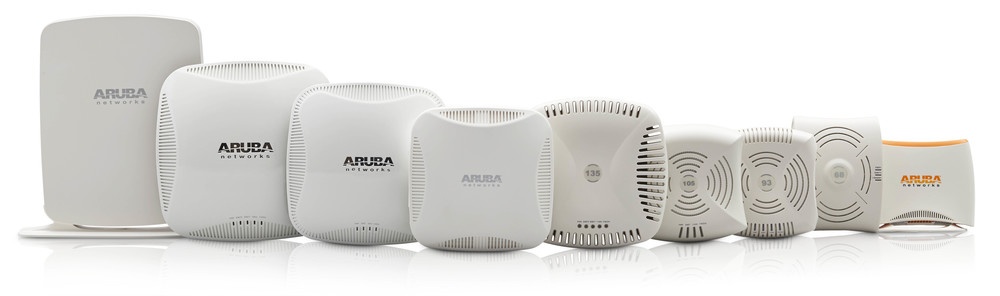
Aruba Instant Access Point (IAP) is a controller-less architecture for WLAN, enabling companies to rapidly deploy wireless networks. In an IAP deployment, the primary IAP is configured and the rest of the IAPs inherit their configurations from the primary. 

FEATURES

The system includes a virtual controller embedded into the access point providing administrators with features that are available on physical hardware controllers. Everything from central management, reporting, role based access and adaptive radio management; all is supported with Aruba Instant.

Like Aruba's controller based access points, IAPs leverage patented ClientMatch technology to ensure that devices are connected to the best AP, which prevents the Wi-Fi network from slowing down as people move throughout your campus.

SECURITY

Aruba’s integrated next-generation mobility firewall leverages deep packet inspection. It classifies traffic by application or application groups so that you can apply prioritization and policies based on your business needs. Additionally, Aruba access points support RFProtect, which provides integrated IPS and spectrum analysis capabilities.

RELIABILITY

Aruba Instant employs a fully distributed architecture and is resilient to failure. The primary virtual controller serves as both an Aruba access point and a full functioning "controller". If an Aruba IAP functioning as the primary virtual controller fails, another IAP automatically inherits the role of the primary virtual controller with no service disruption.

USE CASE

I recently had a customer who wanted to upgrade their existing wireless network. Due to the high costs of the controllers and HA requirements, they decided not to move forward even though their legacy WLAN was problematic and out of compliance. When we introduced them to Aruba Instant, they discovered that deploying Aruba IAPs provided all the controller features, security and high availability they required. In addition, they were able to leverage the latest 802.11ac standard without expensive controllers. Our wireless team put together a complete solution that included professional services to migrate off of their existing infrastructure and tuning to maximize coverage. They have rolled out IAPs to multiple sites and are very pleased with the performance.

If you would like to learn more about Aruba's controller-less wireless architecture, please contact your local Bird Rock Systems representative or visit our contact page.

In coming articles, I will discuss how Aruba Instant access points integrate with the Aruba’s cloud solution (Aruba Central), integration with AAA solutions like Clearpass, and discuss Airwave for administering and monitoring multiple IAP networks.

Read More

BYOD – It can be done safely - Part 2

Aug 20, 2014 / by Joseph Javien posted in Security, Wireless, BYOD

Written By: Larry Hoehn

In my last post, I discussed combining technologies to provide secure BYOD access. Before we jump into the specifics, let’s pick apart the technology components – starting with the wireless technology.

Modern wireless solutions provide awareness of all traffic across the network to support a variety of users, devices, and applications. Old-school network architectures mandate that parallel networks be constructed to address different needs– for example, one VLAN for employees, a second for full-time contractors, and a third for guests. In other cases, multiple SSIDs were required. Today’s design methods support multiple user categories on a single network.

How It Works

During the network sign-on process, the identity and role of each user or device is learned. Employees and other authorized users may be treated as a single class, or divided according to a series of administrator-defined policies. These policies follow the user throughout the network, and are applied uniformly across wireless, wired, and remote access connections.

Learn This

This entire premise is made possible by using a firewall instance around every user: tightly controlling what the user is permitted to do and providing separation between user classes. To provide the highest level of security, the solution requires knowledge of user identity when making access control decisions. Our wireless and next-generation firewall solutions enable us to deliver this level of security. 

The wireless technologies we work with provide us an important point of authentication and policy enforcement. Policy control is tied to user identity rather than port, IP address, or MAC address. This makes it impossible for a user to bypass security controls, except in the case of breached credentials. (Protect your passwords! We will talk about that in a future post.)

A use case for this is a guest user on the guest network that attempts to bypass the guest network by configuring a laptop with the MAC address and IP address of an employee also known as spoofing an address. With the proper policies in place, that malicious guest user will be denied access to the employee network because of his guest privileges regardless of mac address or IP address of the device. 

Role Based Policy, Granular Control & API Integration

Taking this a step further, role-based policies can limit maximum and guarantee minimum amounts of bandwidth for a particular user or class of users. This allows IT to provision a specified amount of service to bandwidth-hungry applications. In addition, granular control of users, such as automatic disconnect from the network, role re-assignment, and dynamic updates of firewall policies are available as well.

Behind the scenes, additional functionality is enabled by powerful API integration between various IT solutions from different manufacturers. The APIs can enable captive portal authentication systems, or query external databases to control advanced behavior. This includes integration with solutions that provide services such as virus protection, content inspection and filtering, intrusion detection and prevention, and content transformation.

An example of this could be a posture assessment. A check can be performed to make sure anti-virus scans have been run within the past week and provide different network access depending on the criteria of this test.

We Can Help!

As you can see, there is a lot of flexibility, control and added security that can be delivered with the proper solutions, policy and controls in place when it comes to BYOD. For more information, please contact your local Bird Rock Systems Account Manager or send us a message on our Contact page

In my next post, I will do a deeper dive on the next-generation firewall part of the equation. Then I’ll wrap the wireless and firewall technologies together. Stay tuned!

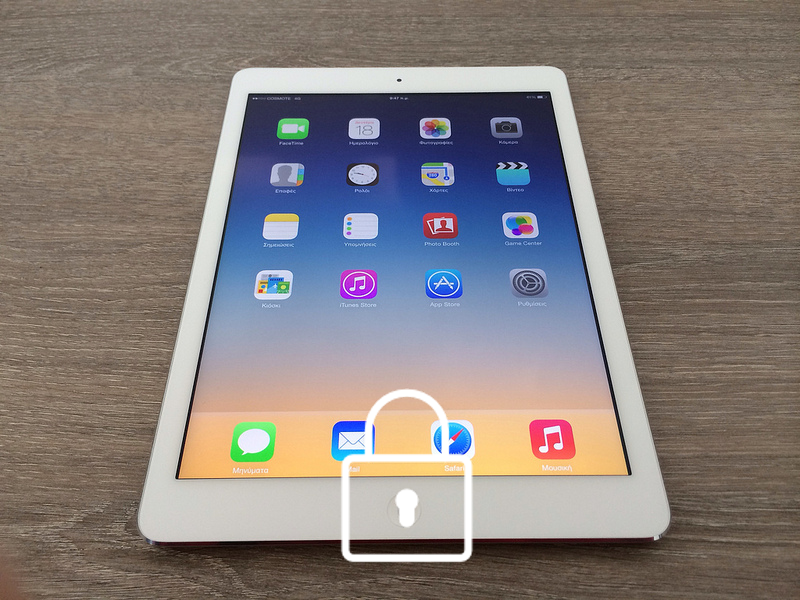
Photo credit: John.Karakatsanis / Foter / Creative Commons Attribution-ShareAlike 2.0 Generic (CC BY-SA 2.0)

Read More

August Summer Social with Bird Rock Systems & AITP

Aug 19, 2014 / by Joseph Javien posted in In The News, AITP, Events

It’s summer and many of us could use a break from the heat, travel and preparations of the upcoming Fall season.  Take a little time away from the office and join us in a relaxed outdoor setting at Brian Malarkey's Green Acre in the Campus Pointe complex. It will be a nice evening with food, drinks, and company set around a beautiful garden with a variety of IT professionals.  

Please join the AITP S.D. community in partnership with Bird Rock Systems at our August Summer Social August 19th from 5:30pm - 8:30pm. It will be an evening of relaxation, fun, and networking. Please bring a friend along as well.

Schedule

  • Aug. 19, 5:30-8:30 – Food, Fun, Networking

Location:

Green Acre Campus Pointe
10300 Campus Point Drive 
San Diego, CA 92121
 
(858) 450-9907

View Map

Registration

  • Member: $25
  • Non-Member: $35
  • In Transition & Students: $15
  • At the Door: $45

Register Now!

Read More

Bird Rock Systems' Jim Matteo on Technology & Entrepreneurship

Jul 16, 2014 / by Joseph Javien posted in In The News, Jim Matteo, technology solutions, Bird Rock Systems, entrepreneurship

On May 15, 2014 San Diego Daily Transcript Executive Editor, George Chamberlin, sat down with our CEO, Jim Matteo, to talk about technology solutions we provide to enterprise businesses as well as Jim's efforts to foster entrepreneurship. Enjoy!


Read More

BYOD – It can be done safely

Jun 30, 2014 / by Larry Hoehn posted in Security

There is no silver bullet for the ‘Bring Your Own Device’ concept, but by embracing BYOD, employees can be more productive and your company can reduce capital expenses. Safely allowing devices to connect to your network is about policy and layers of technology, many of which you probably already have in place today if you allow employees to connect via VPN to your network from their home PC. Allowing devices without those considerations can be reckless to your company and its employees.

I’ll discuss a number of aspects to consider for BYOD in a series of posts. This post focuses on a high-level example of technology that can help securely permit employee devices to access corporate resources.

Combining next generation wireless solutions and next generation firewalls provide security for guest and employee owned mobile devices on enterprise networks. You can securely enable Bring Your Own Device and Guest Access while maintaining compliance. These technologies can share user, device and application information to monitor and enforce application usage policies on smartphones, tablets and laptops – regardless if the devices is connected via Wi-Fi, wired network, a cellular provider, or a VPN connection.

Traditional firewall policies are based on IP address, but the allocation of IP addresses to corporate and guest users means that the user and group associations are not reflected in those policies. Imagine your firewall is seamlessly integrated with enterprise directories to identify users of the corporate network. Now imagine your BYOD management solution utilized that same technology to guest users and employee owned mobile devices.

Security policies on the next-generation firewall can be defined based on the user and/or group membership. This cohesive system provides complete visibility and control over the applications and resources available to all network users. The combined solution provides safe enablement of resources in situations such as:

  • Securing users and devices on guest Wi-Fi networks
  • Allowing access to applications while protecting from potentially dangerous content
  • Full visibility (traffic by user and application) and control of network resources
  • Integrated wired and wireless policies compliance and enforcement

Stay tuned for more posts on this topic.

Read More

San Diego Daily Transcript: How secure is your IT infrastructure?

Mar 10, 2014 / by Joseph Javien posted in In The News, IT Solutions, Security, Bird Rock Systems

When it comes to your company’s technology infrastructure you want to build it with top of the line, secure solutions. Bird Rock Systems is a local technology solutions provider founded in 2003 that does just that!

Read More

UT San Diego: Use of Personal Devices at Work Gaining Acceptance More Personal Devices Seen at Work

Nov 25, 2013 / by Joseph Javien posted in In The News, Jim Matteo, Security, BYOD

Growing BYOD trend still raises security concerns

These days, employees are bringing to their workplaces their own personal devices, like smart phones, tablets and laptops.

In the past, a lot of companies weren’t too keen on the idea of allowing workers to use their own equipment. The overriding concern was about security of company data, as well as being uncomfortable with employees storing work information on personal devices.

Now, it appears that such thinking is starting to change. There’s a phenomenon spreading through business across the country that’s known as Bring Your Own Device, or BYOD.

“As companies keep recruiting millennials, BYOD is going to be important in keeping them happy,” said Jim Matteo, CEO of San Diego-based Bird Rock Systems, which provides network security solutions for a wide variety of businesses.

For the full story visit:

http://www.utsandiego.com/news/2013/nov/25/tp-use-of-personal-devices-at-work-gaining/

Read More

Get a Panoramic View of your firewalls with Panorama

Sep 18, 2012 / by Larry Hoehn posted in Security

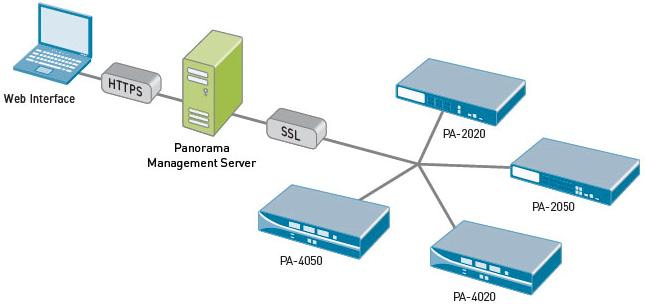
Panorama is a virtual appliance available from Palo Alto Networks that provides visibility and controller over multiple PAN next generation firewalls. All logs and content data get bubbled up into an aggregate view. Reports are based on that aggregate view – all activity from all firewalls on one report. This feature is licensed separately from the firewalls themselves.

This is a high-level overview of the architecture:

The Panorama GUI looks almost exactly like the traditional PAN GUI, which means a very small learning curve to get started with centralized visibility and control of your PAN environment.

You get 3 benefits:

  • Centralized device and policy management of multiple Palo Alto Network firewalls
  • View applications, users and content flowing across multiple Palo Alto Network firewalls
  • Complete device management in a secure manner from a central location -- CLI or GUI are both included

With Panorama and a network of Palo Alto Networks firewalls in place, you can deploy global or local policies to block bad applications, protect the business applications and promote the secure use of end-user applications.

Panorama is a VMware image, purchased separately from the firewall itself, downloadable from the Palo Alto Networks support site. To install:

  1. Register the Panorama serial number on the support site.
  2. Download Panorama image zip file from the download page. Unzip the file.
  3. Open vCenter or your vSphere management interface of choice, and deploy the Panorama OVF on a thick provisioned disk.
    • Use a 4GB maximum RAM limit if you have 10 or more managed firewalls.
    • Use a quad core CPU for the best performance, especially with high logging rates.
    • Use RAID 1/0 for the logging virtual disk for better write performance. The drives can be optimized for sequential writing of a small number of large files.
    • Network based storage introduces latency and should be avoided when there are high logging rates.
    • Start the virtual machine and login to the virtual machine’s console using the default login credentials.
  4. Configure the networks settings at the CLI and commit the changes.
  5. Login to the GUI with your browser using the default login credentials.
  6. Change the admin login/password.
  7. Assign the serial number, configure time/NTP, and import or generate a SSL certificate.
  8. Add the firewall’s serial numbers for the devices to manage.
  9. Commit the changes and you’re good to go.

Once you can see the devices, you can define a set of devices that are treated as a unit when applying policies: Panorama > Device Groups. From there, you can see which device configurations are out of sync. With caution, you can “commit all” next to each device in Panorama. I say ‘with caution’ because interesting things can happen with security policies and other configuration tidbits that are slightly askew (e.g. upper case vs. lower case, etc.).

Read More

PART 2: Choosing a Partner That is Loyal to Customer Success

Sep 11, 2012 / by Joseph Javien

It is important to work with the right technology partner to be more effective at making IT purchases. Finding the right technology VAR can take some time. The first meeting with a technology partner can be like a first date: the VAR obviously wants to make a good impression so the customer will work with them. But as a customer and technology partner “date” the real colors comes out. Sometimes the good of the partner really shines through. They are very responsive, detailed and are committed to helping the customer achieve their goals. Other times, partners can fall short. Whether it’s slow turn-around time on quotes, lack of expertise or high-pressure selling, these all lead to a poor customer experience.

Loyalty to customers is a core value of Bird Rock Systems. We strive to build strong relationships with our customers and earn their trust by being very responsive to their needs and acting in the utmost integrity. Trust is paramount in any relationship and it takes time. The more a partner understands the vision of a customer’s business and understands their challenges, the better they can serve them. Loyalty is one of the reasons that a significant amount of Bird Rock Systems’s business comes from repeat customers.

Customers aren’t looking for a “sales person.” What they really need is someone that can help them accomplish their goals.

Read More

Panachrome: More GUI functionality for Palo Alto Networks Firewalls

Sep 04, 2012 / by Larry Hoehn posted in Security

I ran into a free extension for the Google Chrome browser in early 2012 and I use the extension often enough that I forgot it was an extension until a customer asked about it during a firewall demonstration. If you have a Palo Alto firewall running 4.1, check this out. Thanks to ‘lmori’ for posting this on the Palo Alto Networks DevCenter (support login required).

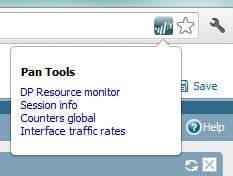
The extension allows the GUI to display a bit of information normally only available from CLI. The extension uses an API introduced in PAN-OS 4.1. Installation steps are at the bottom of this post. This works with Chrome browsers only.

You need to be logged on the firewall with superuser privileges to use the extension. The PAN logo will appear on the Chrome URL bar:

Here are some of the coolness you’ll notice. Desktop notifications on jobs completion:

DP Resource monitor - the output of "show running resource-monitor" command:

Session info - the output of "show session info" command:

Counters global - the output of "show counters global" command:

Interface traffic rate - the average rates of physical and logical interfaces:

INSTALLATION

  • Login to the Palo Alto Networks support site.
  • Go to lmori’s post: https://live.paloaltonetworks.com/docs/DOC-1986
  • Follow the link to grap the crx file.
  • Drag and drop the .crx file on a Chrome window. Your mileage will vary with this step, depending on the Chrome version you’re using. You may need to play with the Chrome options that the browser to install an extension that is outside of the Chrome Web Store.
  • That’s it. Use Chrome to login to your firewall and enjoy!
Read More

Lists by Topic

see all

Posts by Topic

see all

Recent Posts